DataFoundry is a free tool that generates a data architecture recommendation based on your actual constraints — data sources, team size, compliance requirements, budget. You answer six questions; it returns a tailored architecture with a component diagram, tool recommendations, and a prioritized build plan.
This is the technical story of how it's built — the architecture decisions, the things that went wrong, and what I'd do differently.
The architecture
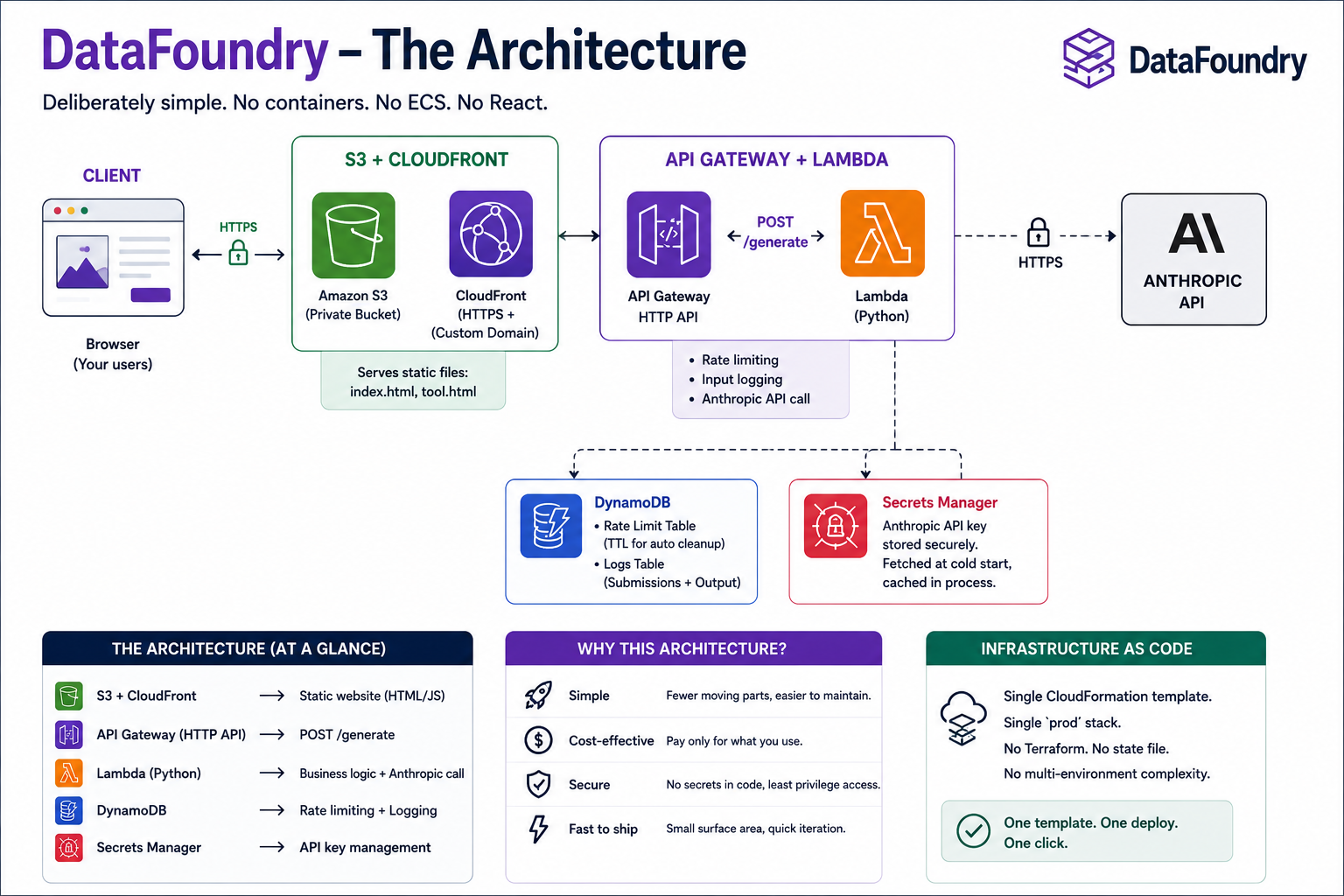
DataFoundry is deliberately simple. No containers. No ECS. No React. The whole thing is:
- S3 + CloudFront — a private S3 bucket serving two HTML files (`index.html` and `tool.html`) through CloudFront with HTTPS and a custom domain.
- API Gateway + Lambda — a single HTTP API route (`POST /generate`) proxied to a Python Lambda function that handles rate limiting, input logging, and the Anthropic API call.
- DynamoDB — two tables: one for rate limiting (with TTL for automatic cleanup), one for logging every submission alongside the generated output.
- Secrets Manager — the Anthropic API key lives here, fetched at Lambda cold start and cached in-process. Never in environment variables, never in CI.
The entire infrastructure is defined in a single CloudFormation template. No Terraform. No state file to manage. No separate stacks per environment — just a single `prod` stack with named resources.
Why no React
The tool has a 6-step form with conditional logic, a loading state, and a rich results page with a component diagram rendered in pure HTML. It's a real UI. React would be a reasonable choice.
I chose vanilla HTML and JavaScript for a few reasons. First, no build pipeline means no `node_modules`, no webpack config, no version drift, no CI step for the frontend. The deploy is just `aws s3 cp`. Second, the business logic is simple enough that a SOLID-structured JS object model handles it cleanly — `AppState`, `PromptBuilder`, `ApiClient`, `UIController`, `ResultRenderer`, `DiagramBuilder`. No framework needed when the requirements fit in one file.
The tradeoff: the JS is longer than the equivalent React component tree would be, and there's no hot reload during development. For a side project I'm the only developer on, that's an acceptable tradeoff.
The Lambda structure
The Python Lambda handler is organised into focused classes following the same logic: `Config`, `IPExtractor`, `RateLimiter`, `InputLogger`, `AnthropicClient`, `ResponseBuilder`. The `lambda_handler` function is a thin orchestrator that calls these in sequence and returns the result.
Rate limiting runs three independent windows: a 10-second burst window (1 request), a 1-hour window (3 requests), and a 24-hour window (5 requests, configurable via environment variable). IPs are hashed with SHA-256 before use as DynamoDB keys — the rate limiter never stores a raw IP. If DynamoDB is unavailable, the rate limiter fails open — the request goes through. Availability trumps strict rate limiting.
The ACM gotcha
The one thing that trips up almost everyone building a CloudFront + custom domain setup on AWS: ACM certificates for CloudFront must be in us-east-1, regardless of where your other resources are.
CloudFront is a global service, but it reads certificates from us-east-1 only. If your certificate is in us-west-2 or any other region, you will not be able to attach it to your CloudFront distribution. The error message is unhelpful. The solution is to always request CloudFront certificates in us-east-1.
I put this in the CloudFormation template explicitly, with a comment, because I've watched multiple engineers burn an afternoon on it.
The CORS gotcha
CORS for a Lambda + API Gateway setup requires headers in two places: the preflight `OPTIONS` response and the actual method response. Getting headers in only one will result in CORS errors that look like backend failures.
The pattern that works: configure CORS on the API Gateway stage (which handles OPTIONS automatically), and also return `Access-Control-Allow-Origin` in every Lambda response. Belt and suspenders. Any time you change the CORS configuration in one place, remember to check the other.
The CI/CD pipeline
Deploys are triggered by push to `main` on GitHub. The GitHub Actions workflow does four things:
- Package `proxy.py` into `proxy.zip` and upload to S3 (the Lambda code bucket).
- Deploy the CloudFormation stack, passing a dummy placeholder for the Anthropic API key — CloudFormation never overwrites the real key already in Secrets Manager.
- Sync the frontend HTML to S3 with appropriate cache headers.
- Invalidate CloudFront (`/*`) so the new HTML is served immediately.
The API key handling is worth calling out. The key is never a GitHub secret. It's stored in Secrets Manager, set once manually with the AWS CLI, and never touched by CI. The CI placeholder pattern ensures CloudFormation can deploy without overwriting the production key on every push.
What I'd do differently
Two things:
First, I'd add the CloudFront URL-rewrite function from the beginning. I added clean URLs for the blog later, which required a manual stack redeploy. If I'd included the function on day one, it would have been part of the initial setup and never needed a separate change.
Second, I'd write the DynamoDB input logging schema more carefully. The schema I have is functional, but adding new fields requires updating both the Lambda code and my mental model of what's in the table. A more explicit schema document, kept next to the code, would have saved some confusion.
Everything else has held up well. The no-framework, no-build-step approach has made the frontend easy to iterate on. The single CloudFormation template has made infrastructure changes visible and reviewable. The Lambda structure has made the backend easy to extend without touching existing logic.
The lesson
The most common feedback I get on the DataFoundry architecture is some version of: "isn't this too simple for a production tool?" It's not. Simple is the goal. Every layer of complexity you add is a layer you have to maintain, debug, and explain to the next person who touches the code.
A two-HTML-file frontend deployed to S3 serves millions of requests reliably. A single-table Lambda handles rate limiting and logging with no operational overhead. A CloudFormation template that fits on one screen is faster to understand than a Terraform module split across six files.
The best architecture for a side project is the one that lets you ship, iterate, and maintain it without it becoming a second job.
DataFoundry is live at datafoundry.tech. It's free. If you're designing a data stack and want a structured starting point, try it.
Supreeth M Gowda has spent 12+ years across data engineering, software engineering, performance engineering, and data science. He now consults through Encore — learn more about him and his services.